
Important menu items for research on this site include search, tag search and tagging by subject. In addition, watch-page for tracking changes, talk pages and the Main Menu are navigation aids always available to registered users with at least viewer access.
TOP BAR - USER NAVIGATION AND TOOLS
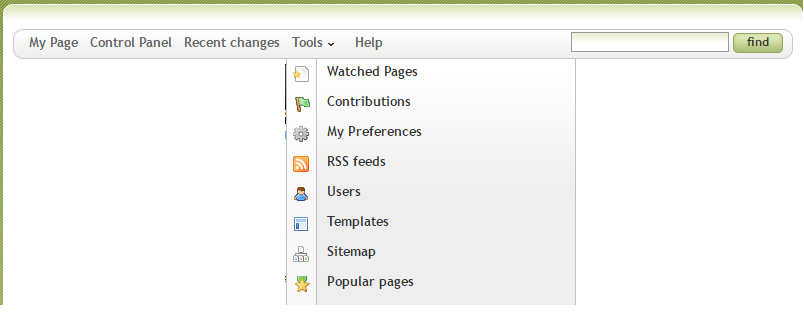
MY PAGE - Go directly to this loginid's personal Home page profile and Activity log.
CONTROL PANEL - User interface, which is available to users above a certain role in this site
RECENT CHANGES - A listing of the latest changes to any page generated for which you have current permission to view.
TOOLS▼ TAB
Top bar drop down is presented as follows.
(TOOLS tab) WATCHED PAGES - a listing is generated of all article pages you have subscribed to in one reference.
(TOOLS tab) CONTRIBUTIONS - This displays Recent Changes, but indexed by changes made by the user you are researching.
(TOOLS tab) PREFERENCES - User defined specific settings for your experience on this site.
(TOOLS tab) RSS FEEDS - RSS XML generated feed material for so-enabled web services or browsers.
(TOOLS tab) USERS - complete report listing current users as links to each of their home/activity log pages and the last access dates for each.
(TOOLS tab) TEMPLATES - complee listing which links to all available MindTouch core templates whether they are utilized or not.
(TOOLS tab) SITE MAP - a complete listing linking to article-, talk- and user- pages accessible to your specific loginid.
(TOOLS tab) POPULAR PAGES - a glance at the top fifty article pages ranking the highest number of unique views by any viewer, including non-member views on publicly viewable article pages.
SEARCH BAR - use to search for titles and article body text as well as link addresses, for specific test strings.
TAG SEARCH - Used to list all pages related by site-determined search keywords, especially common industry terms or biographical correlations in addition to project names or listed locations.
PAGE TOOLS BAR - MANIPULATING CURRENT ARTICLE PAGE
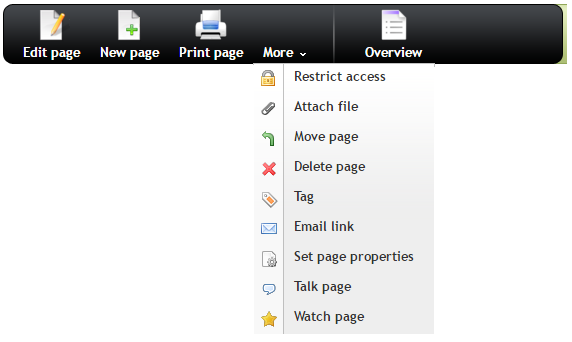
EDIT PAGE - make changes to the article or talk page you are on right now.
NEW PAGE - Generate a new article page as a subpage to the current one.
PRINT PAGE - Use your system hardware to obtain a hard copy, or the site/browser's available print-to-file function to produce a document for sharing or publishing.
OVERVIEW - Display a drop-down of format dictated items aka TABLE OF CONTENTS for this article page.
Overview is NOT available in your user: home page, but CAN be used in any subpages started under it instead.
MORE▼ TAB
More Tab drop-down is presented as follows:
(MORE tab) RESTRICT ACCESS - change your article's viewability or edibaility to control info as it is developed.
(MORE tab) ATTACH FILE - (also Attach image section below all articles) dialog for uploading supported image or related files for inclusion in the article page.
(MORE tab) MOVE PAGE - place an article in a diffrent tree of the database after first save, or prior to deleting its parent article, or to categorize articles found to be saved in the wrong category.
(MORE tab) DELETE PAGE - permanently delist and delete article and its subpages. You may only delete what you have created, and are subject to deletion by admin and other regular maintenance of the site.
(MORE tab) TAG or tagging by subject - actual authoring and curating of above tag metadata, used by curator level (editing, contributing, maintenance site admin.
(MORE tab) EMAIL LINK - share this article to email recipient
(MORE tab) WATCH PAGE - users can subscribe to articles they have not created, to monitor for changes thereafter.
(MORE tab) SET PAGE PROPERTIES : This is a set of text fields that can each be set with a value specific to each article to classify it over and above tags. These fields and their associated values are internal reports searchable for analytics only and are considered developer territoy at MPMedia.
(MORE tab) TALK PAGE - correspondence with regard to each article, between any and all registered site users. Always listed chronologically, a single thread discussion with date stamps.
- Was this page helpful?
- Tag page (Edit tags)
- What links here
Files 2

| File | Size | Date | Attached by | |||
|---|---|---|---|---|---|---|
| Untitled.png No description | 18.91 kB | 20:22, 21 Feb 2026 | Freon | Actions | |
| Untitled2.png No description | 24.76 kB | 20:28, 21 Feb 2026 | Freon | Actions | |
| Images 2 | ||
|---|---|---|
 |  | |